Showing posts with label eBrush. Show all posts

Thursday, October 15, 2015

Trick or Treat House-Mouse

Me again. I have a tutorial for you over the Spectrum Noir Blog. It's step-by-step showing to make the super easy background on this Halloween card.
 

Not into making Halloween Cards? Not a problem. This background can be switched up and made into any theme you like. That's what is great about being a stamper...right? ;)


The sentiment is stamped and heat embossed with Vivid Green Embossing Powder. The House-Mouse images are stamped, colored, trimmed and adhered with foam adhesive. Everything is colored with Spectrum Noir Markers: Black, FS2, FS3, GB8, GB9, IG2, IG4, IG6, IG8, IG10, GB1, GB3, GB5, OR2, CT2, CT4

Hop on over to the Spectrum Noir Blog an to check out my tutorial. Leave a quick comment so I know you stopped by. I'd love to her from you!

Have a happy day,


Supplies:
Spectrum Noir Markers
Craftwell eBrush (with Spectrum Noir Marker adapter)
Wide Art Masking Tape (or other low-tack stamping mask paper)
Crafter's Companion Circle Die
White Cardstock
Stampabilities Sentiment Stamp
Hero Arts Tree Stamp
House-Mouse Halloween Stamp
VersaMark Ink Pad
Memento Tuxedo Black Ink Pad
Black Soot Distress Ink Pad
Stampendous! Vivid Green Embossing Powder
Anti-Static Pouch
Heat Embossing Tool
Black and Green Cardstock
A Mue Studio Orange polka dot A2 Notecard
Fence Border Punch
Sequins and Rhinestones

Sunday, April 19, 2015

Just Imagine You're Here!

Have you checked out all the NEW Sheena Douglass stamps that have been added to the A Little Bit Sketchy Collection from Crafter's Companion? Oh my word!!! FUN!!!

I used 2 of the new stamp sets on this card - Endless Summer and The Beach. With summer right around the corner, this just makes me all sorts of happy.


I did all the coloring with Spectrum Noir Markers. For the water and sunset, I used markers and airbrushed with my eBrush. So simple! I love simple...how about you? :)

  • Sunset - CT3, CT4, GB5, OR2, CR7 (with eBrush)
  • Ocean - BG6 (with eBrush)
  • Surfboard- EB2, GB8, CT2, BT2, BT5, CR2
  • Tree Trunk - EB2, EG6
  • Palms - CG1, CG2, DG3
  • Sandals - IG5, IG9, Blender

The sand beach panel is hand cut from Gold Dust Shimmering Cardstock topped with Antique Linen Stickles glitter glue and then sprinkled on top (while glue is still wet) some Distress Antique Linen Dry Glitter. I did the same on the little mound under the flip flops. The sentiment is diecut and popped up on foam adhesive. It's hard to see...but I also made some coconuts on the palm trees using Cinnamon Stickles. The surfboard also has a touch of Orange Peel Stickles for a bit of sparkle.


Ahhhh....what a beautiful place to imagine.
 
Thanks for stoppin' by,


Supplies
Crafter's Companion Sheena Douglass A Little Bit Sketchy - Endless Summer stamp set
Crafter's Companion Sheena Douglass A Little Bit Sketchy - The Beach (sentiment)
Crafter's Companion Die'sire Scalloped Circles Dies
Crafter's Companion Shimmering Cardstock Gold Dust
Spectrum Noir Ultra Smooth Premium White Cardstock
Spectrum Noir Markers
White, Blue and Black Cardstocks
Ranger Distress Antique Linen Stickles
Ranger Distress Antique Linen Dry Glitter
Ranger Orange Peel Stickles
Ranger Cinnamon Stickles
Natural Twine
Memento Tuxedo Black Ink
Masking Paper
Dimensional Foam Adhesive

Monday, March 16, 2015

March Spectrum Noir Challenge

Hey friends. Have you had a chance to check out this months Spectrum Noir Challenge?

March Spectrum Noir Challenge: Use a Sentiment

This is super easy...right? Create anything you want using your Spectrum Noir alcohol markers, blendable colored pencils, AquaTint inks, or the new Spectrum Aqua watercolor markers, and use a sentiment. Get all the challenge and prize details HERE.

For my card, I used Spectrum Noir Markers with the eBrush and a stencil.


The stencil I used is Crafter's Companion Sheena Douglass - Burst. I placed it on the white cardstock panel and airbrushed with CT5. Then, I slightly turned the stencil and airbrushed with CT1. I slightly turned it again and sprayed with Gold Shimmer Spritz. Super easy!

The cross is stamped and heat embossed with Metallic Gold Embossing Powder. I actually stamped the cross once again, right on top of the embossing, added more gold ep and heat set again. All the shimmer and shine looks even  more beautiful in real life! For added shimmer, I mat the panels with Crafter's Companion Black  Pearl Shimmering Cardstock.


Hope you can play along with us for the challenge. Thanks for stopping by!


Supplies
Spectrum Noir Markers CT5, CT1
eBrush
Crafter's Companion Sheena Decorative Stencil - Burst
Crafter's Companion Shimmering Cardstock - Black Pearl
Tsukineko Shimmer Spritz - Gold
Paper Smooches Stamp Set - Spiritual Sampler
Metallic Gold Embossing Powder
VersaMark Ink
Black Ink
Corner Rounder Punch
Circle Punches
Heat Embossing Tool
Clear Pebbles
Dimensional Foam Adhesive
Glossy Accents

Friday, February 27, 2015

Creating a simple sunset

Happy Friday everyone! I'm not sure if you checked out my blog post a few day back (here), the card with the airbrushed background. On that post, I shared a link to a "creating a sunset" tutorial on the Spectrum Noir Blog. Make sure and pop on over to check it out.

I used the eBrush to make the sunset panel on this card as well. Then I stamped the beautiful scene. As a reminder, you don't need to have the eBrush to create a simple sunset. The tutorial doesn't show using an airbrush. I was inspired by the tutorial to make the simple sunset - and to get out my eBrush and play around with it. Both ways turn out amazing! You can also experiment with different marker colors.


 I airbrushed the Spectrum Noir markers in this order: CR8, OR2, GB5, GB6

To stamp the scene, I used a 2 stamp sets from Crafter's Companion: Sheena's A Little Bit Scenic Silhouette Garden and Sheena's A Little Bit Sketchy - Silhouette Wildflowers. I stamped off some of the ink, where you see the lighter shaded stamped images. I heat set the ink to make sure it was completely dry before stamping and embossing the final images. The embossing powder I used is called Black Sparkle from Ranger. Sooo cool!


The sentiment is from A Muse Studio, and is stamped with VersaFine Onyx Ink. Main image is mat on black cardstock, then 3D mounted. 3 little black rhinestones give a nice balance and connection to the image panel.

May your day be as beautiful as a simple sunset.


Supplies:
eBrush
Spectrum Noir Markers: CR8, OR2, GB5, GB6
Memento Luxe Tuxedo Black (images)
Spectrum Noir Ultra Smooth Premium White CS

Crafter's Companion Sheena's A Little Bit Scenic - Silhouette Garden
Crafter's Companion Sheena's A Little Bit Sketchy - Silhouette Wildflowers
Sentiment from A Muse Studio
 
VersaFine Onyx (sentiment)
Ranger Black Sparkle Embossing Powder
Bazzill Black CS
Black Rhinestone Stickers
Heat Embossing Gun

Sunday, February 22, 2015

eBrush Background

Hello everyone. I've been playing with my eBrush and Spectrum Noir Markers. Happy stuff was created :)


Isn't this amazing?!!! Airbrushing with the eBrush is sooooo fun and easy. True Story ;)

Spectrum Noir Markers used to airbrush in this order: CR8, OR2, GB5, GB6


After airbrushing, I stamped the sentiment as a focal image. I double embossed it with white ep. What I mean by that is, I stamped and embossed 2 times. When the first layer cooled, I stamped again, making sure to line up exactly over the top, then added more embossing powder and heat it a  2nd time. That produced more of a raised texture. The panel is popped up with foam tape on the card base. A few orange sequins for a finishing touch.

Give it a try. If you don't have the eBrush, try coloring with your markers following the "Creating a Sunset" tutorial over on the Spectrum Noir Blog HERE. Most importantly...have fun creating!

Thanks for stopping by :)

Supplies:
Spectrum Noir Markers
eBrush System with Spectrum Noir Marker Adapter
Spectrum Noir Ultra Premium White Cardstock
Blue Cardstock
VersaMark Ink
White Embossing Powder
Anti-Static Pouch
Heat Tool
Orange Sequins
Stitched Die and Rectangle dies
Foam Adhesive
A Muse Studio Stamp and sequins


Follow us on:

Thursday, February 19, 2015

As seen on TV

Hey stampers,

Have you seen all the new Crafter's Companion Floral Bebunni stamps? They are sooo CUTE! Actually, this stamp AND my card were on TV! That's right...yesterday on HSN with Sara Davies, the founder of Crafter's Companion. Here's a picture of it on the screen:


I 'm famous! LOL


Here's a better look at the card...


This stamp is from the Bunches of Love set. It's hard to pick a favorite Bebunni image...but this might be the one. I really enjoyed coloring it. The blue background around the image, and the blue cardstock I did with the eBrush. So simple!

I embossed the white card base with the Petite Dot 6" x 6" Embossing Folder. The button is attached to a die-cut flower from the Die'sire Waltz Decorative Frame Die. The paper piercing I did by hand. In the closeup pic, you can see where I painted on some Sheer Simmer Spritz - Sparkle. To do that, I just sprayed a squirt on my craft mat and painted it on with a paintbrush.


Spectrum Noir Markers used to color and airbrush: BG1, BG3, BG5, Blender, CR2, CR8, CR11, BT1, BT2, BT4, BT6, DG1, DG3, CG2, CG3, CT3, CT4
 
Check out all the great samples using the new Bebunni Floral Stamp Sets HERE. Inspiration galore!

Now, how about I give you my autograph?
Thanks for stoppin' by!

Thursday, December 18, 2014

Spectrum Noir CAS Challenge

Hi everyone! 1 week until Christmas! YIKES!!! Right now...if you're like me...getting things done quick is high on my priority list. Soooo....this will be QUICK! A quick post to show a quick tag and a quick reminder to play the Spectrum Noir December "Clean and Simple" Challenge. All the details can be found HERE.

I never seem to have enough tags...so here's a quick idea using Spectrum Noir Colored Pencils and a Spectrum Noir Marker in the eBrush. This Santa is as cute as they come! :)


Instructions:
  1. Die-cut a bunch of tags from white cardstock (I used Scalloped Tags from Crafter's Companion).
  2. Stamp the image on a Post-it Note (or masking paper of your choice) and trim out image --  above the line only. This is to make a mask for airbrushing.
  3. Stamp the image and words on all tags with black ink. I used a stamp set from A Muse Studio called Santa Mail. TIP: Position all stamps on 1 stamping block. Then you can ink up and stamp ALL the images at the same time for each tag! GREAT time-saver!
  4. Color all the Santa's with colored pencils. (colors listed below)
  5. Place mask over Santa and quickly airbrush with brush nib or chisel nib of a blue Spectrum Noir Marker marker. I used IB1 with the brush nib in the eBrush System. Do this to all the tags.
  6. Add glitter accents as desired.

Spectrum Noir Blendable Colored Pencils:
  • Face - 004, 009
  • Hat and Sleeves - 025, 026, 120
  • Gloves - 120
We would love to see what CAS projects you make this month with your Spectrum Noir products. You have till the end of the month to enter. Have fun and keep it Clean and Simple!
 

Tuesday, December 16, 2014

Candy Cane Stripes

This is one of my favorite card designs!


The bold red "candy cane" panel was soooo easy to make! I created it using my eBrush and 1 Spectrum Noir Marker. I've got a tutorial on how to create Candy Cane Stripes over on the Spectrum Noir Blog HERE.  I'd love for you to pop on over and check it out.

And check out the cool chalkboard effect! The stamp is from Crafter's Companion Vintage Christmas Collection Sentimentals Friends and Family Set. The chalkboard cardstock is diecut & embossed from Die'sire Rectangles Die Set. The green label behind it was die-cut and embossed from green cardstock using the Die'sire Scalloped Tag Die set.


Have a Merry Day!


Other Supplies Used:
Neenah White, A Muse Studio Grass Green and Tiny Dots Black, DCWV Chalkboard CS, 1/2" Mask Tape, lime green rhinestones, silver stretch cording, red mini clothespin, sanding block, white pigment ink, white embossing powder, anti-static pouch, mini jingle bells, dimensional foam tape, heat embossing tool, die-cutting/embossing machine

Sunday, December 14, 2014

A Merry Little Christmas - Card and Tutorial

YES...you STILL have time to make Christmas cards...but you better hurry! If I can make a card in one evening...ANYONE can! LOL

Here's what I whipped up last  night with a bunch of my Crafter's Companion and Spectrum Noir Goodies...


(Supplies listed at end of blog post)

Instructions:

Step 1: Die-cut Scenic Pines from textured white c
ardstock.

Step 2: Create a mask for air-brushing by die-cutting another Scenic Pines from scrap cardstock. Trim away trees.

Step 3: Position mask and secure with repositionable tape. Airbrush trees with JG6 marker -spraying smaller trees a little darker than bigger trees.

Step 4: Remove mask carefully, to prevent tearing the paper.

Step 5: Using BG6 marker, color tree trunks and small areas where larger trees overlap the smaller trees. This will create depth.

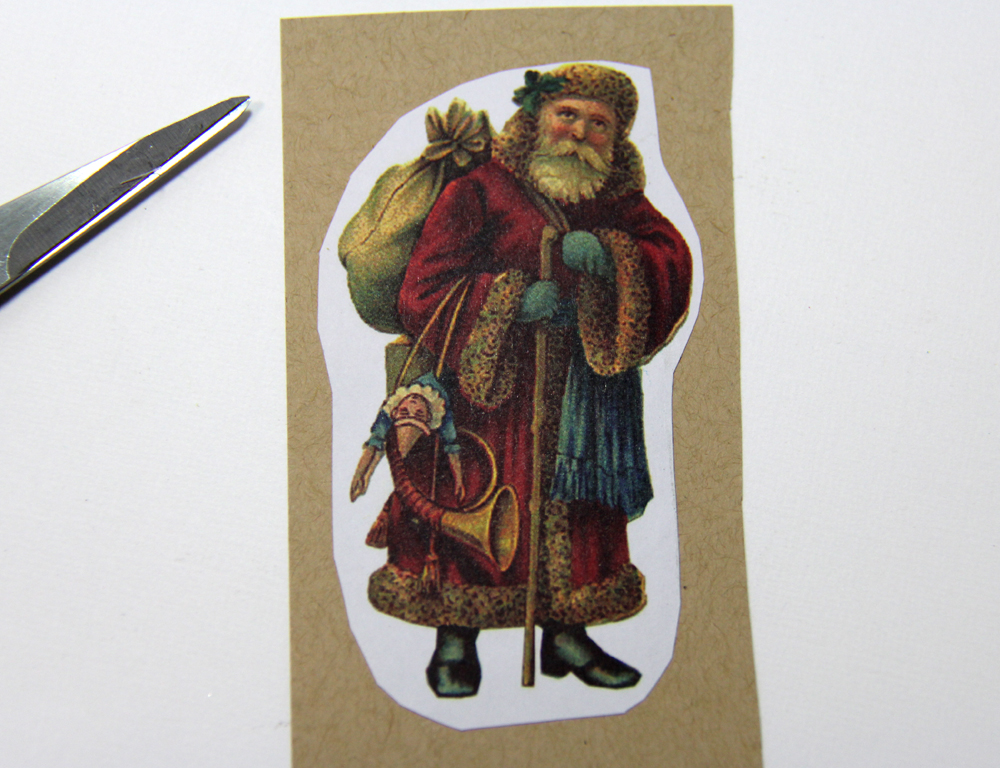
Step 6: Adhere Santa image to scrap piece of Kraft cardstock. This will create a sturdy piece to trim out and attach to card. Closely trim image with detail scissors. NOTE: The Santa image is from the paper pack that is included with the Crafter’s Companion Inspiration Magazine Issue 5 - Christmas Edition.

Step 7: Lightly sponge edges with Walnut Stain Distress Ink.

Step 8: Emboss 5” x 3 ¾” Kraft cardstock panel with snowflakes embossing folder. Sponge on Old Paper Distress ink with ink blending tool. Also, sponge this ink color around the edges of the Scenic Pines die-cut piece.

Step 9: Sponge on Aged Mahogany Distress ink with ink blending tool.

Step 10: Sponge on Walnut Stain Distress ink with ink blend tool.

Step 11: Apply Clear Rock Candy Distress Stickles to all 3 pieces. Let dry completely.

Step 12: Stamp sentiment with VersaMark on red cardstock. Apply embossing powder and heat emboss. Trim with scissors to create a banner.

Step 13: Apply Distress Stain around outer edges of front of 5 ½” x 4 ¼” Kraft notecard. Let dry.

Step 14: Assemble Card as follows: Adhere snowflake panel to 5 ¼” x 4” red cardstock panel. Staple sentiment to panel. Adhere tree border. Attach entire panel to notecard with dimensional foam tape. Attach Santa to card with dimensional foam tape.

IF by chance you don't get all those handcrafted cards done in time for Christmas, just change up the sentiment. It could be a "thank you" or "thinking of you" card. Or just leave off the sentiment and write a letter inside. Remember the days of writing letters? Yeah...text messages just don't say it like a handmade card with your very own handwriting. Just sayin'


Have a great day!


Supplies:
Crafter's Companion Vintage Christmas Collection EZ Mount Stamp Set - Sentimentals Home For Christmas
Crafter’s Companion Inspiration Magazine Issue 5 - Christmas Edition - Paper Pack and Vintage Christmas Snowflake Flutter Embossing Folder
Die'sire Classiques Christmas Scenic Pines Die
Shimmering Cardstock Candy Red
Kraft Cardstock
Textured White Cardstock
Spectrum Noir Markers JG6, BG6
Craftwell eBrush
VersaMark Ink
Distress Inks - Aged Mahogany, Walnut Stain and Old Paper
Ink Blending Tools
Distress Stickles Clear Rock Candy
Ranger Liquid Platinum Embossing Powder
Distress Stain Picket Fence
Mini Stapler
Dimensional Foam Adhesive
Washi Tape or Easy Release Tape
Heat Embossing Tool
Detail Scissors
Die Cutting/Embossing Machine

Sunday, November 30, 2014

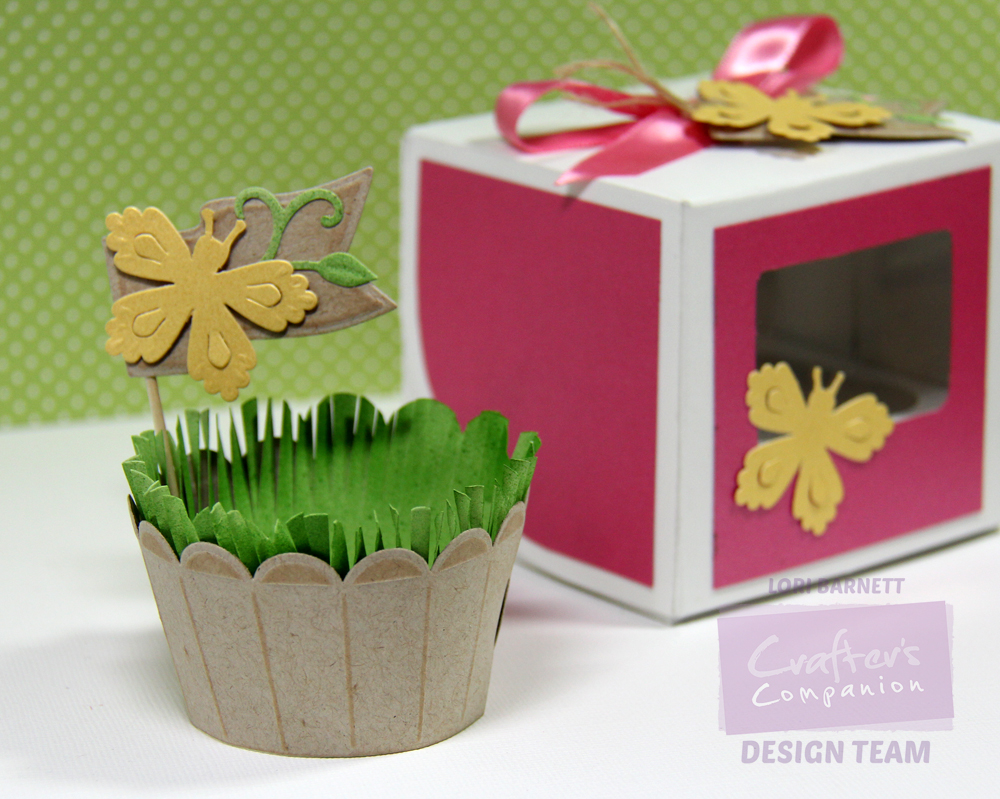
Window Cupcake Box

Hi everyone! I have another Crafter's Companion USA project to share :)


This time I made use of the matting and layering markings on the box template to make an acetate window and side panels from Rose Pearl Shimmering Cardstock. Really fun!

I also used the Lace Bloom 3D Flower Die with Yellow Pearl Shimmering Cardstock to make a butterfly. All I did was trim one of the flower petals.


***STAY TUNED on the Crafter's Companion Blog for my tutorial on how to make the cupcake wrapper with grass!***


Once again...thanks so much for stopping by :)
Hugs,


Thursday, November 20, 2014

Ombre Airbrush Inlay

You still have time to play along with us for the Spectrum Noir November Winter/Christmas Challenge!  Get all the details HERE.

I pulled out my NEW eBrush, Spectrum Noir Markers and a couple new dies to make my card.  I thought it would be fun to go for an ombre-inlay look. I LOVE how it turned out!


I used one Spectrum Noir marker with a chisel nib and the other with the optional brush nib. Each nib sprays differently with the eBrush. Can you guess which color was the brush and which was the chisel?

Merry and the inside of the treess are sprayed with CR8 - chisel nib
The blue background IB2 - brush nib.

Isn't it great how we can use our markers for more than just coloring images?! The eBrush opens the door to soooooo many fun techniques. The only problem I have now is needing another complete set of markers with the brush nibs...so that way I have both! OH BOY! Does the madness ever end?

LOL!

The die cut shapes are from Poppy Stamps - Magnificent Merry and Christmas Baubles. The Christmas stamp is from Crafter's Companion Sheena's a Little Bit Festive - Ivy Borders. I diecut the pieces from white cardstock, airbrushed, pieced back together on another white cardstock piece and trimmed. Then I mounted on a red notecard.

Thanks so much for stopping by today! Please take time to play along with us for the challenge. We LOVE to see your creations :)